
Interactive 2D drag-and-drop badge canvas with live QR code and dynamic credential synchronization
A visual design studio that governs physical and digital visitor credentials: drag elements freely across an interactive canvas, customize typography and brand accents, configure scannable QR credentials, and automatically sync fields from the Form Builder.
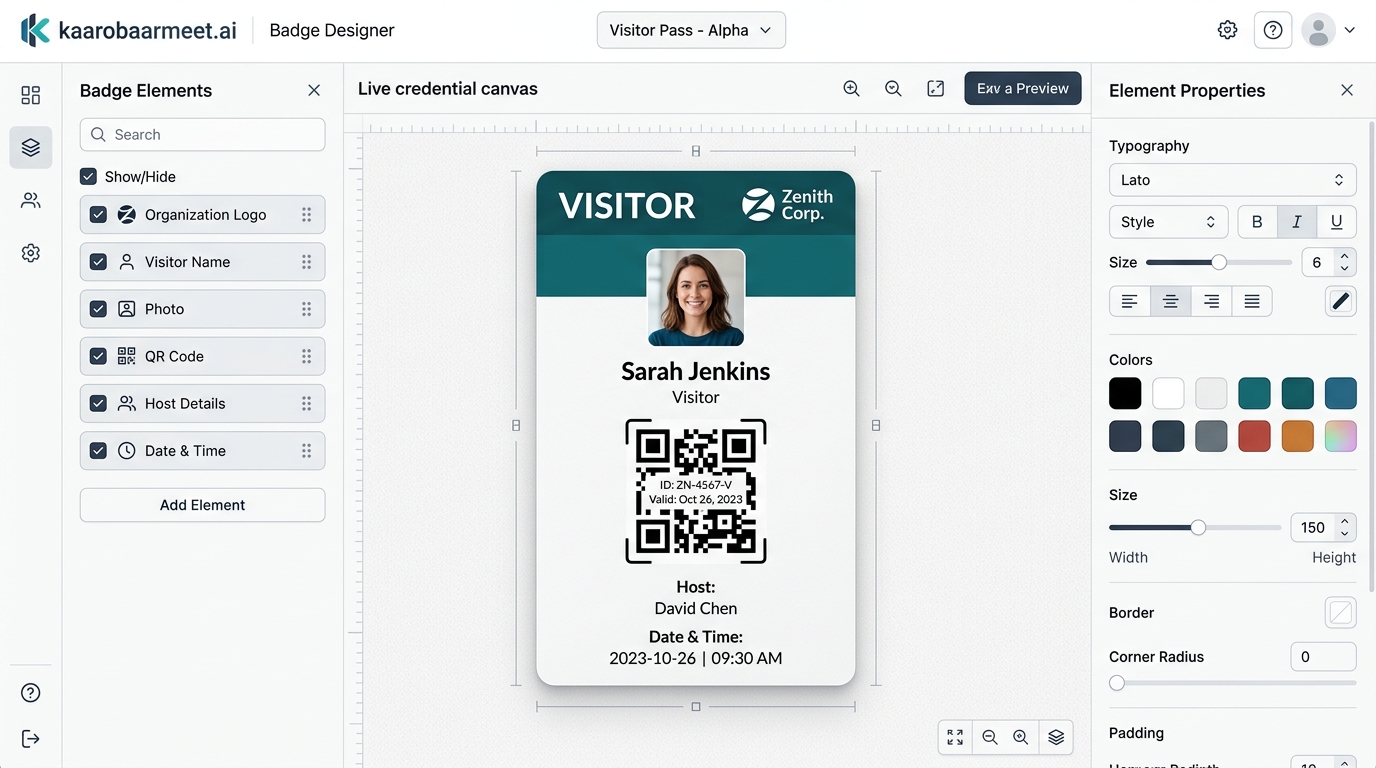
Core components of the Badge Designer engine

Interactive 2D Canvas
Free-form drag-and-drop editor where elements can be repositioned with mouse coordinates across a live badge surface.

Dynamic Form Builder Sync
Walk-In Visitor Passes automatically inherit custom fields defined in the Form Builder, keeping data collection and credentials unified.

Pre-Booked Appointment Pass
Ready-to-use template for scheduled visitors: Host Name, Host Department, Location, Purpose, Vehicle Plate, and Accompanying Guests.

Live Photo & QR Sizing
Granular width and height controls for the captured visitor portrait, organization logo, and high-contrast access QR code.

Typography & Theming Studio
Custom font sizes, weights, background colors, border radius, and brand accent header stripes.

Omnichannel Pass Output
Render designs instantly as on-screen digital passes for Kiosks, digital mobile badges, or print previews for physical badge printing.
Complete control over badge layout and credentials
2D Canvas & Element Placement
Layout Studio- Mouse-driven percentage coordinate dragging (x%, y%) across the live badge canvas
- Interactive show/hide visibility checkboxes for all active badge elements
- Organization logo file upload with custom width and height configuration
- Live captured visitor photo container with customizable dimensions
- High-contrast dynamic QR code container embedded with encrypted check-in token
- Top accent color stripe bar reflecting corporate branding
Dual Credential Templates
Pass Types- Walk-In Visitor Pass: dynamic binding to Form Builder custom registration fields
- Appointment Pass: structured layout for pre-scheduled visitor check-ins
- Visitor ID & Gate clearance number display for security audits
- Host name, host department, and meeting location labels
- Accompanying guest headcount display for group arrivals
- Check-in timestamp and badge validity expiration details
Styling & Output Control
Typography & Output- Standard dimensions (A6 105×148mm) and custom border-radius sliders
- Font size adjustments ranging from text-10px to prominent text-24px headers
- Font weight customization: Normal, Medium, Semibold, and Bold
- Preset color swatches (#0971F8, #10b981, #ef4444, #f59e0b) plus custom hex codes
- Instant in-browser Print Preview with zero third-party drivers required
- 100% paperless on-screen digital badge generation for lobby Kiosks and Mobile
Dedicated interfaces inside the Badge Designer
3-Column Design Studio
An intuitive studio interface: badge element list with visibility toggles on the left, interactive 2D canvas in the center, and typography/theming inspector on the right.
Interactive 2D Drag Canvas
Click and drag any badge element—including name, photo, host details, and QR code—to any position on the badge surface with real-time coordinate tracking.
Form Builder Synchronization
Never re-enter fields manually. Custom questions and inputs added in the Form Builder automatically populate as optional elements in the Walk-In badge layout.
Scannable QR Code Access
Automatically generates high-density QR codes containing visitor IDs and validity timestamps, enabling security desks to scan and verify active passes in seconds.
Live Visitor Photo Integration
Captured portraits from the Kiosk camera or Receptionist webcam automatically scale and render into the designated photo frame on the badge.
Paperless Digital & Print Output
Designed passes can be physically printed via standard browser print dialogs or displayed as rich digital passes directly on lobby tablet screens and mobile devices.
Designing and publishing a badge template in 5 steps
- 1
Select badge category
Choose between 'Walk-In Visitor Pass' (synced with Form Builder) or 'Appointment Pass' (pre-configured for calendar invites).
- 2
Upload logo and choose brand accent colors
Upload your company logo, set dimensions, and select brand accent colors from preset swatches or custom hex inputs.
- 3
Position elements freely across the 2D canvas
Click and drag elements like the visitor photo, QR code, host label, and ID tag to your desired positions on the badge.
- 4
Fine-tune typography and visibility
Use the elements list to toggle field visibility, adjust font size (10px to 24px), font weight, and custom fallback text.
- 5
Save design & test with Print Preview
Save your design directly to the cloud and click 'Print Preview' to verify print alignment or test on-screen digital passes.
Frequently Asked
Questions
Couldn't find what you were looking for?
KaarobaarMeet.ai is a full-stack digital ecosystem OS designed for modern Indian business infrastructure. It powers every touchpoint of visitor check-in, multi-room event scheduling, and enterprise facility operations — replacing physical logbooks with self-service kiosks, encrypted QR passes, instant WhatsApp host alerts, and real-time operations dashboards.
The platform includes 24 modular micro-apps covering Visitor Management, Event Automation, Smart Parking, Smart Badges & Wristbands, Member Directories, Startup Trackers, and Live Command Centers — all accessible under a unified tenant and single sign-on.
Yes. KaarobaarMeet.ai provides an enterprise multi-tenant hierarchy with 13 role-based portals. Corporate headquarters get unified analytics across all cities and branches, while individual security gates, reception desks, and event coordinators operate dedicated local interfaces.
Any standard iPad, Android tablet, touchscreen kiosk terminal, or desktop computer. For physical passes, the system integrates seamlessly with standard thermal printers (Zebra, Brother, TSC) via USB, Bluetooth, or local network.
Pre-registered visitors receive an encrypted QR entry pass directly on WhatsApp prior to arrival. When they arrive and scan in at the reception kiosk or gate, the system alerts the host on WhatsApp instantly with the visitor's photo, designation, and company name.
Design professional physical and digital visitor credentials
Empower your reception and security desks with drag-and-drop badge customization, dynamic QR codes, and automated data synchronization.