
Dynamic drag-and-drop form designer with visual branding studio and instant mobile QR generation
A no-code workspace that governs visitor registration workflows: customize 14 dynamic field types, upload branded banners, apply event templates, configure host approval routing, and instantly deploy forms across mobile web and unmanned kiosks.
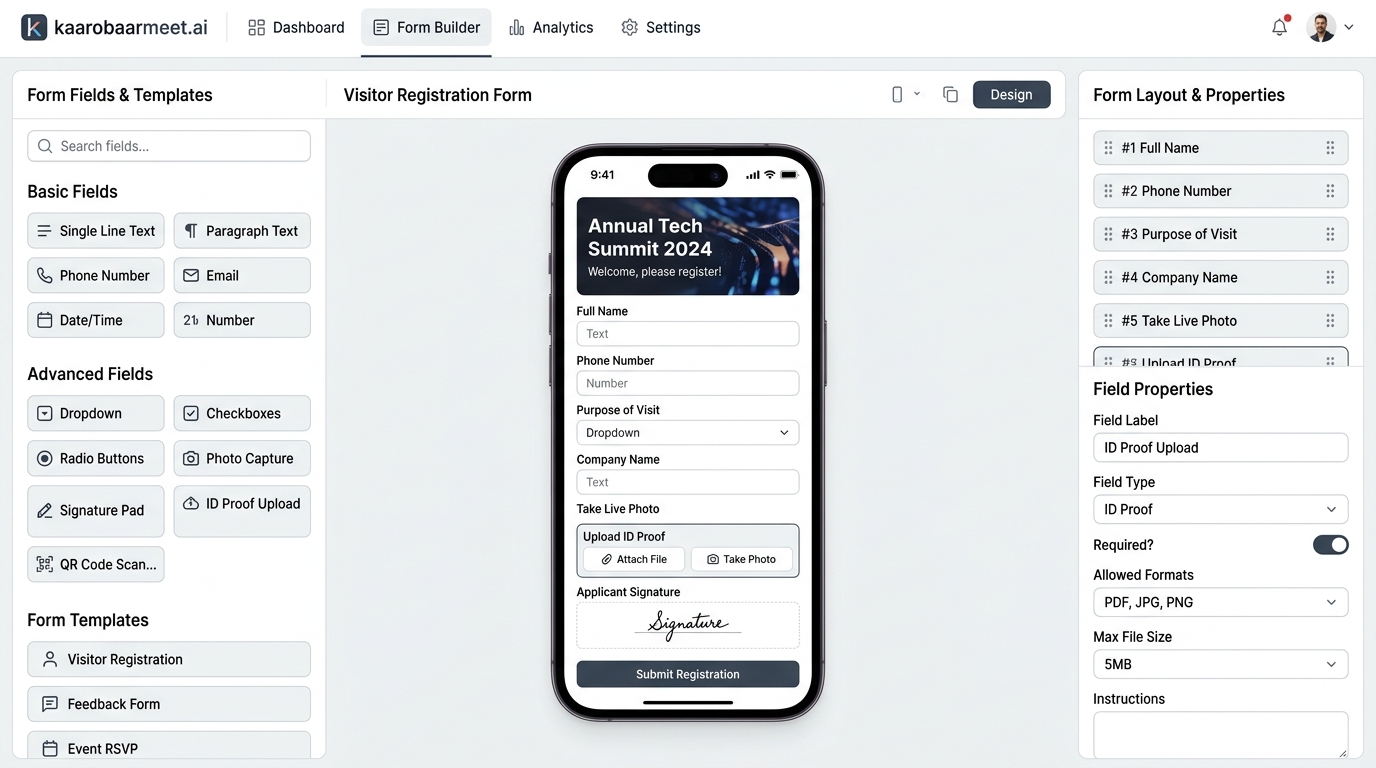
Core components of the Form Builder engine

14 Dynamic Field Types
Palette supporting live webcam photo capture, digital e-signature, government ID verification (Aadhaar, Passport, DL), dropdowns, and rating scales.

Page Design Studio
Full-screen visual customizer for header & footer banners, brand color palettes, glassmorphism styling, and custom background gradients.

Dual Device Live Simulator
Interactive preview pane switching between a realistic mobile phone frame (320px × 640px) and full-screen desktop view with live input testing.

Host Approval Routing Engine
Dynamically injects Department and Host selection menus, routing visitor submissions into a 'Waiting Approval' state before granting entry.

Industry & Event Templates
Instant one-click presets for GITEX Berlin Tech Events, Corporate Lobbies, and Hospital OPD Consents, with custom JSON import/export.

Touchless QR & Web Publishing
Single-click publish creates a shareable web link (/public/register/:orgId) and scannable QR code synchronized across kiosks and reception desks.
Complete control over registration workflows
Dynamic Field Customization
Data Collection- 14 field types: Text, Phone, Email, Number, Dropdown, Radio, Checkbox
- Live webcam photo capture for automated visitor badge portrait generation
- Government ID Proof verification: Aadhaar, Passport, Driving License, Voter ID
- Touch & mouse digital e-signature consent for safety and compliance policies
- Reorderable canvas with visual drag handles and required/optional toggles
- Customizable dropdown and radio options with instant comma-separated editor
Page Design Studio
Visual Theming- Upload custom header and footer banners with real-time height adjustment
- Theme customization: Primary color picker, border-radius, and glassmorphism
- Top compliance alert banner with customizable notification copy and font colors
- Integrated sponsor wall showcasing enterprise partner and sponsor logos
- Customizable footer with visiting hours, venue location, and social media handles
- Digital Terms & Conditions agreement checkbox with expandable policy details
Publishing & Distribution
Omnichannel Deployment- Instant single-click publish to live tenant registration endpoint (/public/register/:orgId)
- Auto-generated scannable QR codes for touchless walk-in registration at kiosks
- Live sync with Receptionist Check-In Desk ensuring uniform registration fields
- Dynamic host authorization gatekeeper routing visits to employee approval queues
- JSON template export and import for multi-location rollout and quick backups
- Real-time client-side image compression preventing high-memory tablet slowdowns
Dedicated interfaces inside the Form Builder
3-Column Studio Workspace
A streamlined tri-pane layout: field palette and templates on the left, real-time interactive device canvas in the center, and layout reordering with properties inspector on the right.
Interactive Device Simulator
Test forms directly inside an interactive mobile smartphone frame or desktop canvas. Mock data entered in the simulator updates the live badge preview in real time.
Page Design Studio
Transform generic forms into branded experiences: upload event banners, set corporate color palettes, embed sponsor logos, and define venue contact details.
Host Approval Routing Rule
When toggled, the form dynamically pulls active departments and hosts from your organization directory, routing visitor check-in requests directly to hosts for review.
Ready-to-Use Industry Templates
Accelerate setup with pre-configured templates for global tech conferences (GITEX Berlin), corporate offices, and hospital outpatient departments.
Instant QR Code & Shareable Links
Generate a live public URL and scannable QR code immediately upon publishing. Display the QR on lobby kiosks or share via email for pre-registration.
Building and publishing a registration form in 5 steps
- 1
Select a base template or start fresh
Navigate to Admin → Forms. Choose from pre-configured templates (Corporate, Event, Healthcare) or start with a standard baseline schema.
- 2
Drag, reorder, and configure fields
Drag necessary fields from the palette onto the canvas. Set field labels, placeholder hints, custom dropdown options, and required toggles.
- 3
Customize branding in Design Studio
Open the Page Design Studio to upload event banners, choose your brand accent color, add top announcement alerts, and embed sponsor logos.
- 4
Set host approval rules (optional)
Toggle Host Approval if visits require host consent. The form automatically injects dynamic Department and Whom-to-Meet routing dropdowns.
- 5
Confirm & Publish live registration URL
Click 'Confirm & Publish' to deploy the form. The system generates a public registration URL and dynamic QR code ready for kiosk and mobile check-in.
Frequently Asked
Questions
Couldn't find what you were looking for?
KaarobaarMeet.ai is a full-stack digital ecosystem OS designed for modern Indian business infrastructure. It powers every touchpoint of visitor check-in, multi-room event scheduling, and enterprise facility operations — replacing physical logbooks with self-service kiosks, encrypted QR passes, instant WhatsApp host alerts, and real-time operations dashboards.
The platform includes 24 modular micro-apps covering Visitor Management, Event Automation, Smart Parking, Smart Badges & Wristbands, Member Directories, Startup Trackers, and Live Command Centers — all accessible under a unified tenant and single sign-on.
Yes. KaarobaarMeet.ai provides an enterprise multi-tenant hierarchy with 13 role-based portals. Corporate headquarters get unified analytics across all cities and branches, while individual security gates, reception desks, and event coordinators operate dedicated local interfaces.
Any standard iPad, Android tablet, touchscreen kiosk terminal, or desktop computer. For physical passes, the system integrates seamlessly with standard thermal printers (Zebra, Brother, TSC) via USB, Bluetooth, or local network.
Pre-registered visitors receive an encrypted QR entry pass directly on WhatsApp prior to arrival. When they arrive and scan in at the reception kiosk or gate, the system alerts the host on WhatsApp instantly with the visitor's photo, designation, and company name.
Build custom, branded visitor check-in forms in minutes
Experience the no-code drag-and-drop Form Builder with live mobile preview and touchless QR self-registration.