Unmanned self-service visitor check-in terminal for lobby tablets and kiosks
A fast, modern touch application designed for front-desk iPads and Android tablets: enables pre-booked guests to scan QR invites, empowers walk-ins to register via mobile QR, captures live facial photos, and issues dynamic on-screen digital passes with zero paper waste.
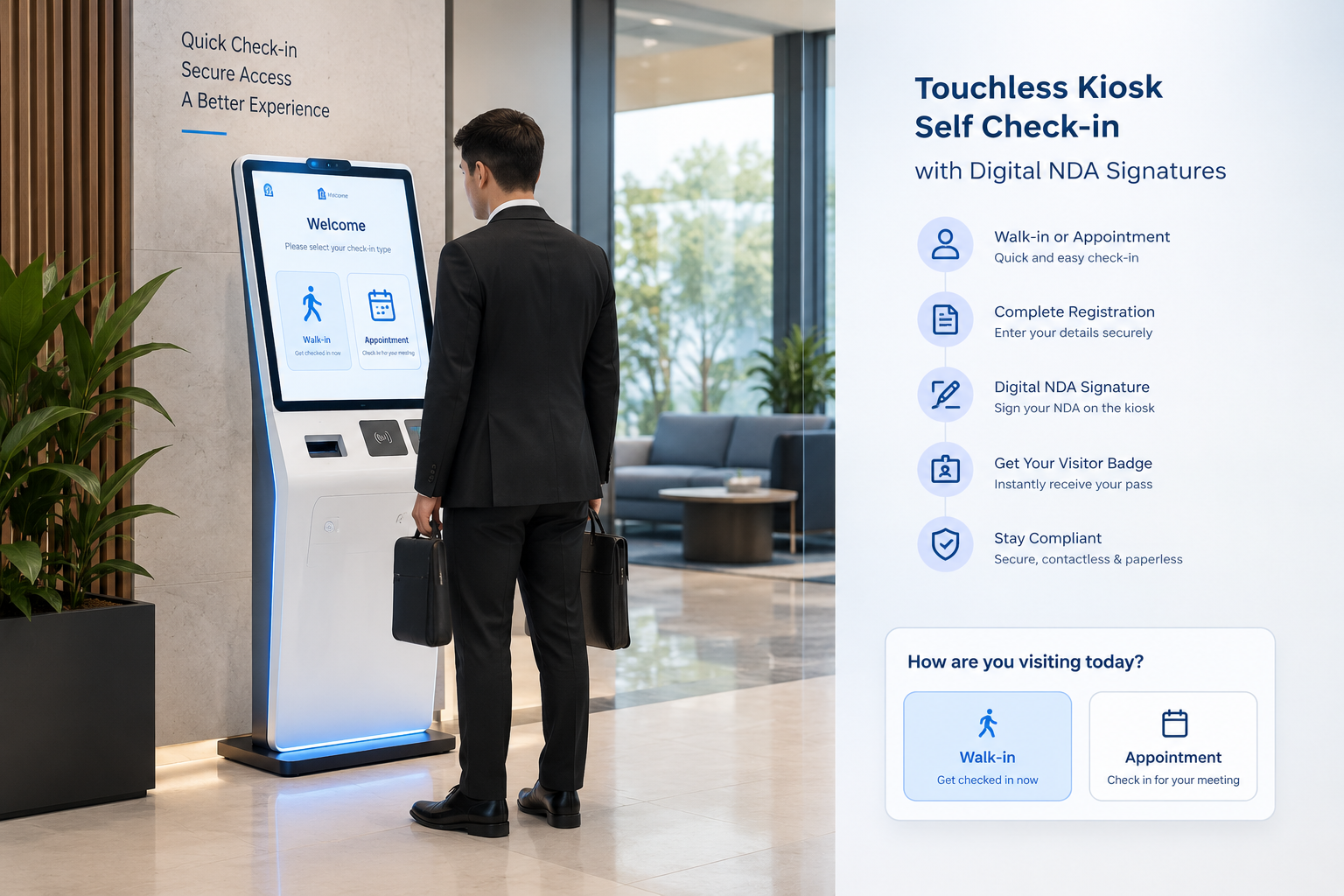
Core capabilities of the Kiosk Interface

On-Screen Digital Pass Output
100% paperless: immediately renders the visitor's customized digital pass with live QR code, photo, host name, and valid time directly on the screen.

Mobile QR Walk-In Onboarding
Kiosk generates a dynamic QR code allowing unannounced guests to scan with their smartphone camera and complete registration on their personal phone.

Front-Camera QR Invite Scanner
Pre-booked appointment visitors align their WhatsApp or email QR pass in front of the camera scanner for sub-second verification.

Live Facial Photo Capture
Integrated in-browser camera module with circular live preview, countdown snapshot, and an optional skip toggle.

Guest Confirmation & Group Count
Interactive review card verifying host name, appointment time, purpose, and accompanying guest count prior to entry pass activation.
Lockdown Mode & Exit PIN
Full-screen kiosk lockdown prevents public visitors from closing the app or accessing system files — staff exit via administrative PIN.
What the Kiosk Interface handles end-to-end
Dual Check-In Pathways
Arrival Flows- Pre-booked appointment check-in via camera laser QR scanner
- Touchless walk-in registration: dynamic QR generation for mobile registration
- Manual invitation code input fallback if camera scanning is bypassed
- Real-time organization directory host lookup
- Automated tenant-branded welcome title, subtitle, and live clock
Data Verification & Visual Capture
Verification- In-browser front-facing camera photo snap with live circular frame
- Review card displaying visitor name, company, email, and phone number
- Accompanying guest counter (`accompanying_count`) and group attendee names
- Automatic verification against backend appointment schedules
- Digital policy guidelines and visit purpose verification
Digital Pass Generation & Notifications
Pass & Alerts- Instant on-screen digital badge rendered from custom Badge Designer templates
- Dynamic scannable QR pass with visitor identity and validity window
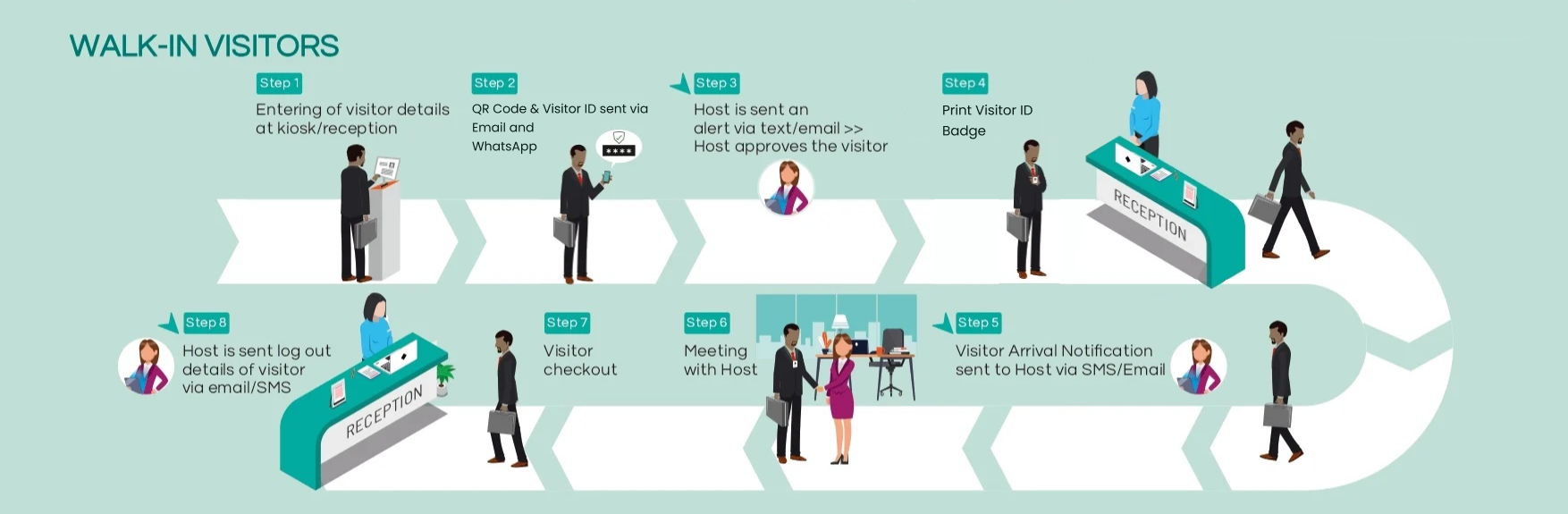
- Automated host arrival notifications dispatched via WhatsApp, SMS, and Email
- Instant real-time check-in sync to the Receptionist Dashboard
- Configurable daily auto-restart timer (e.g. 04:00 AM) ensuring 24/7 lobby uptime
Dedicated modules inside the Kiosk Interface
Front-Camera QR Invite Scanner
The kiosk camera activates automatically with an animated scanning laser. Guests hold up their QR invite received via WhatsApp or Email, instantly retrieving their pre-approved appointment record without re-typing information.
Touchless Mobile Walk-In Registration
To keep lobby traffic fluid and avoid crowds at the kiosk, walk-in guests tap 'Walk-In Visitor' to view a dynamic QR code. Scanning it with their smartphone opens the tenant registration form directly on their personal device.
Live Facial Photo Snap
A live circular camera feed prompts visitors to capture a portrait photo. Captured snapshots are embedded into the on-screen digital badge and saved to the organization's visitor audit log.
Details Review & Accompanying Guests
Displays an intuitive review panel confirming host name, scheduled time, phone number, purpose of visit, and accompanying guest headcounts before finalizing the check-in.
On-Screen Dynamic Digital Pass
Completely paperless pass generation. On check-in completion, the terminal displays the visitor's badge featuring the company logo, captured portrait, host name, validity, and unique QR code.
Full-Screen Lockdown Mode & Exit PIN
Restricts the tablet operating system to the kiosk application. Staff can exit kiosk mode to access administrative configuration only by entering a secure Exit PIN.
Configuring the Kiosk Interface in 5 Steps
- 1
Register and name the kiosk terminal
In Kiosk Config, create or select a terminal profile (e.g. 'Main Entrance Kiosk', 'West Lobby'). Set welcome messages, display orientation, and session timeouts.
- 2
Choose branding & ambient visual themes
Select from 14 modern ambient backgrounds including Aurora Cyberpunk, Oceanic Cyan, Floating Lines, and Space Particles, matching your company branding.
- 3
Configure check-in flow steps
Enable or customize the step progression for both Appointment Flow (QR Lookup → Photo → Confirm → Done) and Walk-in Flow (Mobile QR → Registration).
- 4
Set administrator Exit PIN & Lock Mode
Configure the security exit PIN (default 1234) and enable kiosk lock mode to prevent unauthorized tampering or closing of the kiosk browser.
- 5
Schedule daily auto-restart for 24/7 uptime
Set an automated daily reload time (e.g. 04:00 AM) to automatically refresh browser memory and ensure zero downtime at unmanned lobby entrances.
Frequently Asked
Questions
Couldn't find what you were looking for?
KaarobaarMeet.ai is a full-stack digital ecosystem OS designed for modern Indian business infrastructure. It powers every touchpoint of visitor check-in, multi-room event scheduling, and enterprise facility operations — replacing physical logbooks with self-service kiosks, encrypted QR passes, instant WhatsApp host alerts, and real-time operations dashboards.
The platform includes 24 modular micro-apps covering Visitor Management, Event Automation, Smart Parking, Smart Badges & Wristbands, Member Directories, Startup Trackers, and Live Command Centers — all accessible under a unified tenant and single sign-on.
Yes. KaarobaarMeet.ai provides an enterprise multi-tenant hierarchy with 13 role-based portals. Corporate headquarters get unified analytics across all cities and branches, while individual security gates, reception desks, and event coordinators operate dedicated local interfaces.
Any standard iPad, Android tablet, touchscreen kiosk terminal, or desktop computer. For physical passes, the system integrates seamlessly with standard thermal printers (Zebra, Brother, TSC) via USB, Bluetooth, or local network.
Pre-registered visitors receive an encrypted QR entry pass directly on WhatsApp prior to arrival. When they arrive and scan in at the reception kiosk or gate, the system alerts the host on WhatsApp instantly with the visitor's photo, designation, and company name.
Deploy modern unmanned self-service kiosks in your lobby
Eliminate front-desk queues with instant QR scans, mobile walk-in onboarding, and automated on-screen digital passes.